
A website without an SSL certificate shows up in every visitor’s browser marked “Not Secure” — and Google has counted HTTPS as a ranking signal since 2014. Whether you’re launching a new site, migrating hosts, or just found out your certificate needs replacing, this guide covers everything: what an SSL certificate actually does, whether you need a free or paid one, which type fits your site, what it costs, and exactly how to get one installed.
Before we begin, I recommend reading our comprehensive guide on the benefits of an SSL certificate.
SSL — technically replaced by TLS, though the name “SSL” stuck — is the encryption technology that creates a secure, scrambled connection between a web server and a visitor’s browser. An SSL certificate for a website is a digital file that helps secure the connection between a website and its visitors.: it authenticates your website’s identity and enables that encrypted connection. When you see a padlock icon next to a URL in the address bar, that site has a valid SSL certificate installed.
An SSL certificate for your website does three things at once:
Builds trust: Shows the padlock and HTTPS in the address bar, so visitors feel safe entering information — and are far more likely to leave if they don’t see it.
Do I need an SSL certificate for a website? Yes — every website does. Chrome, Firefox, Safari, and Edge all flag HTTP-only sites as “Not Secure,” Google factors HTTPS into search rankings, and most payment processors and privacy regulations require it outright. There’s effectively no modern website that gets by without one.
Both exist, and each has a place. Free certificate authorities issue Domain Validation (DV) certificates at no cost, and many hosting providers even install one automatically. They provide the exact same encryption strength as a paid certificate.
Where free SSL certificates fall short:
A paid SSL certificate for website makes more sense once you’re handling customer data or payments, or want your business identity verified and displayed through OV or EV. Paid certificates typically come with a warranty (financial protection if the certificate is ever the cause of a breach) and dedicated support to help with installation — both of which free options don’t offer.
The right SSL certificate depends on your website, the information you handle, and how many domains or subdomains you need to secure. Understanding the different types and their use cases can help you choose the right one.
An Extended Validation SSL Certificate (EV SSL) is the highest level of SSL certificate available. All levels of SSL provide the same encryption — what differs between them is the level of identity verification.
An Extended Validation SSL Certificate (EV SSL) provides a higher level of organization verification than DV and OV certificates. All publicly trusted SSL certificates provide encryption; what differs between validation types is how the organization behind the website is verified.
Best suited for: Banks, financial institutions, large eCommerce businesses, and organizations where verified business identity is important.
| Brand | SSL Certificate | Discount | |
| Sectigo | PositiveSSL EV | Up to 40% | Buy Now |
| Sectigo | EV SSL | Up to 71% | Buy Now |
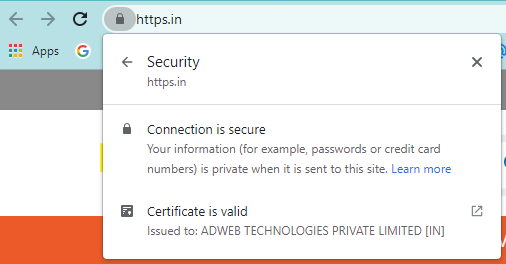
EV SSL takes an extra step to show visitors how safe your website is: when customers click the padlock, they can view your organization’s verified name directly. That gives your website an extra edge and a clear “safe to use” signal — which is exactly why EV remains the standard recommendation for eCommerce and finance sites fighting phishing and impersonation.
Here’s an example:
Organization Validation (OV) SSL certificates authenticate the identity and legitimacy of a business, adding an extra layer of trust beyond DV. Businesses must prove they’re legally registered and that they own the domain they’re securing.
Best suited for: Businesses, organizations, eCommerce websites, and public-facing websites where additional organization verification is important.
OV certificates are available for single domains, multiple domains, and wildcard certificates.
| Brand | SSL Certificate | Discount | |
| Sectigo | InstantSSL (OV) | Up to 73% | Buy Now |
| Sectigo | InstantSSL Pro | Up to 83% | Buy Now |
Benefits of an OV SSL certificate:
Domain Validation (DV) SSL certificates are the fastest and most affordable option. If you’re a business storing sensitive customer information, though, this isn’t the right fit — DV only confirms you control the domain, not who you are.
DV certificates earn their “fast” reputation because they’re issued within minutes, need fewer documents than OV or EV, and go through a lighter validation process.
Best suited for: Blogs, personal websites, portfolios, small business websites, and other websites where organization-level verification is not required.
| Brand | SSL Certificate | Discount | |
| Sectigo | PositiveSSL | Up to 64% | Buy Now |
| RapidSSL | RapidSSL | Up to 71% | Buy Now |
Benefits of a DV SSL certificate:
A Wildcard SSL certificate secures a main domain and its subdomains with a single certificate. For example, *.yourdomain.com can cover shop.yourdomain.com, login.yourdomain.com, and other subdomains.
Best suited for: Businesses managing multiple subdomains under the same domain.
Wildcard certificates are available with Domain Validation (DV) and Organization Validation (OV).
| Brand | SSL Certificate | Discount | |
| Sectigo | InstantSSL Premium Wildcard | Up to 91% | Buy Now |
| Sectigo | PositiveSSL Wildcard (DV) | Up to 79% | Buy Now |
Read More: The benefits of Wildcard SSL Certificate.
A Multi-Domain SSL certificate, also called a UCC or SAN certificate, allows you to secure multiple domain names with a single certificate.
Best suited for: Businesses that manage multiple domains, websites, or related services and want to manage them under one certificate.
Multi-Domain certificates are available at all three validation levels: DV, OV, and EV.
| Brand | SSL Certificate | Discount | |
| Sectigo | PositiveSSL Multi-Domain (DV) | Up to 85% | Buy Now |
| Sectigo | DV UCC | Up to 69% | Buy Now |
The right certificate depends on what your website needs:
Once you know which type fits your website, the next step is to purchase the certificate, validate your domain, and install it on your server.
Since eCommerce websites need to establish trust with online customers, they need to display strong, visible security — which makes Extended Validation (EV) SSL certificates the best fit for eCommerce stores.
EV SSL certificates require a strict verification procedure that validates the website’s owner, and paired with the active padlock and HTTPS protocol, they help keep your eCommerce website free of spoofing attempts.
Read more: SSL certificate for E-commerce portal
Getting an SSL certificate for your website comes down to four stages:
Not as long as it used to. Under the CA/Browser Forum’s Ballot SC-081v3, the maximum validity for every publicly trusted SSL certificate is being cut in phases:
Timeline |
Maximum Validity |
|---|---|
| Today (2026) | 200 days |
| 2027 | 100 days |
| 2029 | 47 days |
Certificates already issued keep their original validity — the shorter caps only apply to new certificates issued from each date onward. But in practice, this means renewing an SSL certificate for website is about to become a much more frequent chore, going from once a year to several times a year by 2029.
Keeping track of renewal dates by hand was manageable when a certificate lasted twelve months. At 47 days, that stops being realistic for most teams — which is why automating the process is quickly becoming the default rather than an optional extra.
This is what AutoCert by https.in is built to solve. Connect it to your server once, and it takes over the entire renewal cycle from there:
Set it up once, and every renewal after that happens quietly in the background — a far better match for a world where certificates renew every few weeks instead of every few years. AutoCert currently supports DigiCert, RapidSSL, Thawte, and GeoTrust certificates; you can see how it works or set it up alongside your next purchase.
DigiCert is a leading brand in cybersecurity. With its acquisition of Symantec’s security business in 2017, DigiCert added a great deal of value to the website security space, giving DigiCert SSL certificates additional features as part of a complete website security solution.
The company also owns several SSL and code-signing certificate brands, including Thawte, GeoTrust, and RapidSSL. DigiCert SSL provides comprehensive website security for enterprise customers looking for more than just SSL.
Sectigo has issued over 100 million digital certificates across 150+ countries, making it the largest commercial CA in the world. It offers different levels of validation, warranties, and features across its SSL certificate range.
From small businesses to large online operations, Sectigo offers a wide range of products at affordable prices — including EV, OV, and DV certificates — making website security straightforward and cost-effective.
As the world’s second-largest PKI certificate provider, GeoTrust is a leading global player in this market, trusted by more than 300,000 customers across 150+ countries.
GeoTrust offers quick delivery at an affordable price, up to 256-bit encryption, and an extensive collection of anti-malware scanning and site-seal authentication.
RapidSSL provides secure sockets layer encryption for securing websites quickly, and its certificates are trusted by more than 99% of all web browsers. As the name suggests, RapidSSL offers very affordable single-domain and wildcard certificates with basic domain validation, backed by unsurpassed customer service and technical support.
Founded in 1995, Thawte was the first Certificate Authority to issue certificates outside the U.S. and was a pioneer in the SSL certificate market. It has since earned over 40% market share and issued more than a million SSL and code-signing certificates protecting identities and transactions in 240+ countries.
Cost depends almost entirely on validation level. DV certificates are the cheapest — they only confirm domain ownership, so there’s minimal verification work involved. OV certificates cost more, since the CA verifies your business registration. EV certificates sit at the top of the range, reflecting the most thorough identity verification process available.
Multi-year terms, Wildcard coverage, and Multi-Domain (SAN) coverage also affect price, since they cover more ground than a single-domain, single-year certificate. For current pricing across every brand and type, see our SSL certificate price comparison.
As you’ve seen, there’s a lot to weigh when choosing an SSL certificate for your website — free or paid, DV, OV, or EV, single-domain or wildcard. Match the certificate to what your site actually does: a blog can run on a free DV certificate, but a site handling payments or logins is better served by a paid OV or EV certificate with warranty and support behind it.
We hope this guide helped you find the right SSL certificate for your website. If you’re still not sure which certificate is right for you, feel free to reach out to us or use the SSL wizard below. Happy to help!
Yes — every website needs one. Beyond protecting your customers’ sensitive information, it’s effectively mandated by Google: HTTPS sites are considered the modern standard, while sites without an SSL certificate are flagged “Not Secure.”
Choose a Certificate Authority and certificate type, generate a CSR, complete domain (or organization) validation, then install the certificate on your server and force HTTPS across your site — see the full step-by-step walkthrough above.
It’s a digital file installed on your web server that encrypts the connection between your site and its visitors and verifies your site’s identity — it’s what puts the padlock icon and “https” in front of your domain.
Both options exist. Free certificates cover basic domain validation at no cost but renew every 200 days and come without a warranty or dedicated support. Paid certificates add longer validity, Organization/Extended Validation, warranties, and support — worth it once your site handles payments, logins, or customer data.

If you have any questions, feel free to call us toll-free
Toll-Free Call: +91 +91-22-42978097


The 2023 Guide to SSL Certificate for website